
Understanding Object-Oriented Programming in JavaScript

If you've been coding for a while, you've probably heard the term "Object-Oriented Programming" or OOP thrown around. It sounds fancy and complicated, but I promise it's actually pretty straightforward once you get the core concept.
Today, we're going to break down OOP in JavaScript in a way that actually makes sense. Let's dive in!
What is Object-Oriented Programming?
Object-Oriented Programming (OOP) is a way of writing code that organizes everything around "objects" rather than just functions and logic.
Think of it like this: instead of having a bunch of scattered functions and variables floating around, you group related data and behaviors together into objects. It's like organizing your messy room into labeled boxes so everything has its place!
The Blueprint Analogy: Understanding Classes
Imagine you're a car manufacturer. Before you can make cars, you need a blueprint. A design that shows what every car should have: 4 wheels, an engine, doors, seats, etc.
The blueprint = Class
The actual cars you build from that blueprint = Objects
Blueprint (Class)           Actual Cars (Objects)
     Car                    →  Red Toyota Camry
      |                     →  Blue Honda Civic
      |                     →  Black Tesla Model 3
One blueprint, many cars. That's OOP!
In programming terms:
A class is a template/blueprint for creating objects
An object is an instance created from that class
What is a Class in JavaScript?
A class is like a cookie cutter. It defines the shape, but it's not the cookie itself. You use it to create actual cookies (objects).
Here's the basic syntax:
class ClassName {
  // Class body goes here
}
Let's create a simple Car class:
class Car {
  // Properties and methods will go here
}
Important: Classes Are Syntactic Sugar
Here's something you need to know: JavaScript is fundamentally a prototype-based language, not a class-based one.
What does this mean? Unlike languages like Java or C++, JavaScript doesn't actually have "true" classes. The class keyword was introduced in ES6 (2015) to make the syntax cleaner and more familiar to developers coming from other languages, but under the hood, it's all functions and objects.
Classes in JavaScript are what we call syntactic sugar a nicer-looking way to write something that could be done with functions.
Here's the same thing written both ways:
// Modern way with class (syntactic sugar)
class Car {
  constructor(brand, model) {
    this.brand = brand;
    this.model = model;
  }

  getInfo() {
    return `\({this.brand} \){this.model}`;
  }
}

// Old way with function (what's actually happening)
function Car(brand, model) {
  this.brand = brand;
  this.model = model;
}

Car.prototype.getInfo = function() {
  return this.brand + " " + this.model;
};

// Both work exactly the same!
let car1 = new Car("Toyota", "Camry");
console.log(car1.getInfo());  // "Toyota Camry"
Both approaches create the exact same result! The class syntax is just cleaner and easier to read.
Why does this matter?
Understanding that classes are functions helps you understand how JavaScript really works
When you see
class, remember it's just a fancy way to write constructor functionsBehind the scenes, JavaScript uses prototypes to share methods between objects
You might see older code using function constructors
For now, don't worry too much about prototypes (that's a deeper topic). Just know that when you use class, JavaScript is converting it to functions and prototypes behind the scenes. The class syntax is perfectly fine to use since it's cleaner, more readable, and this is how modern JavaScript is written!
The Constructor Method: Setting Up Your Objects
The constructor is a special method that runs automatically when you create a new object from the class. It's where you set up the initial properties.
Think of it as the factory setup when a new car rolls off the assembly line it is where you set the color, model, year, etc.
class Car {
  constructor(brand, model, year) {
    this.brand = brand;
    this.model = model;
    this.year = year;
  }
}
Breaking it down:
constructor()is the special setup methodParameters (
brand,model,year) are the values you pass in when creating a carthis.brand = brandassigns those values to the object's propertiesthisrefers to the specific object being created
Creating Objects from Classes
Now that we have a blueprint, let's build some cars!
To create an object from a class, use the new keyword:
class Car {
  constructor(brand, model, year) {
    this.brand = brand;
    this.model = model;
    this.year = year;
  }
}

// Create actual car objects
let car1 = new Car("Toyota", "Camry", 2023);
let car2 = new Car("Honda", "Civic", 2024);
let car3 = new Car("Tesla", "Model 3", 2023);

console.log(car1);
// Car { brand: 'Toyota', model: 'Camry', year: 2023 }

console.log(car2.brand);  // "Honda"
console.log(car3.year);   // 2023
See that? One class, three different cars! Each with its own brand, model, and year.
Adding Methods to Classes
Objects aren't just data
they can also have behaviors (functions). In OOP, we call these methods.
Let's give our cars some abilities:
class Car {
  constructor(brand, model, year) {
    this.brand = brand;
    this.model = model;
    this.year = year;
    this.speed = 0;  // All cars start at 0 speed
  }

  // Method to display car info
  getInfo() {
    return `\({this.year} \){this.brand} ${this.model}`;
  }

  // Method to accelerate
  accelerate(amount) {
    this.speed += amount;
    console.log(`\({this.brand} \){this.model} is now going ${this.speed} km/h`);
  }

  // Method to brake
  brake() {
    this.speed = 0;
    console.log(`\({this.brand} \){this.model} has stopped.`);
  }
}

// Create a car
let myCar = new Car("Toyota", "Camry", 2023);

// Use the methods
console.log(myCar.getInfo());
// "2023 Toyota Camry"

myCar.accelerate(50);
// "Toyota Camry is now going 50 km/h"

myCar.accelerate(30);
// "Toyota Camry is now going 80 km/h"

myCar.brake();
// "Toyota Camry has stopped."
Beautiful! Each car object can now perform actions (methods) using its own data.
Real-World Example: Person Class
Let's look at another example that's super relatable:
class Person {
  constructor(name, age, city) {
    this.name = name;
    this.age = age;
    this.city = city;
  }

  introduce() {
    console.log(`Hi, I'm \({this.name}. I'm \){this.age} years old and I live in ${this.city}.`);
  }

  haveBirthday() {
    this.age += 1;
    console.log(`Happy Birthday! \({this.name} is now \){this.age} years old.`);
  }
}

// Create people
let person1 = new Person("Rahul", 22, "Mumbai");
let person2 = new Person("Priya", 25, "Delhi");

person1.introduce();
// "Hi, I'm Rahul. I'm 22 years old and I live in Mumbai."

person2.introduce();
// "Hi, I'm Priya. I'm 25 years old and I live in Delhi."

person1.haveBirthday();
// "Happy Birthday! Rahul is now 23 years old."
One Person class, but it can create unlimited unique people!
Encapsulation: Keeping Things Organized
Encapsulation is a fancy word for a simple idea: bundling related data and functions together.
Instead of having variables and functions scattered everywhere:
// Without OOP - messy!
let carBrand = "Toyota";
let carModel = "Camry";
let carSpeed = 0;

function accelerateCar(amount) {
  carSpeed += amount;
}

function getCarInfo() {
  return carBrand + " " + carModel;
}
You encapsulate everything into a class:
// With OOP - organized!
class Car {
  constructor(brand, model) {
    this.brand = brand;
    this.model = model;
    this.speed = 0;
  }

  accelerate(amount) {
    this.speed += amount;
  }

  getInfo() {
    return `\({this.brand} \){this.model}`;
  }
}
Everything related to a car is inside the Car class. That's encapsulation!
Benefits:
Code is more organized and easier to understand
Related functionality stays together
Easier to maintain and update
You can reuse the class to create many objects
Why Use OOP? Code Reusability
Here's the big win: Write once, use many times.
Without classes, creating multiple similar objects is repetitive:
// Without classes - repetitive!
let student1 = {
  name: "Arjun",
  age: 20,
  course: "CS",
  showDetails: function() {
    console.log(`\({this.name}, \){this.age}, ${this.course}`);
  }
};

let student2 = {
  name: "Sneha",
  age: 21,
  course: "IT",
  showDetails: function() {
    console.log(`\({this.name}, \){this.age}, ${this.course}`);
  }
};

// Copy-paste for every student... not ideal!
With classes:
// With classes - write once!
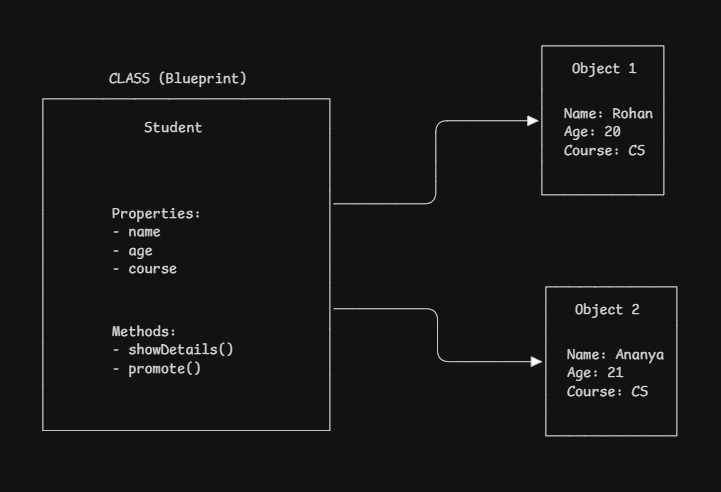
class Student {
  constructor(name, age, course) {
    this.name = name;
    this.age = age;
    this.course = course;
  }

  showDetails() {
    console.log(`\({this.name}, \){this.age}, ${this.course}`);
  }
}

// Create as many as you need
let student1 = new Student("Arjun", 20, "CS");
let student2 = new Student("Sneha", 21, "IT");
let student3 = new Student("Vikram", 22, "ECE");
Visual Breakdown: Blueprint to Object
Quick Reference Cheat Sheet
// Define a class
class ClassName {
  // Constructor runs when creating new object
  constructor(param1, param2) {
    this.property1 = param1;
    this.property2 = param2;
  }

  // Method (function inside class)
  methodName() {
    // Use this.property to access object's data
    console.log(this.property1);
  }
}

// Create object from class
let objectName = new ClassName(value1, value2);

// Access properties
objectName.property1;

// Call methods
objectName.methodName();
Wrapping Up
Let's recap what we learned about Object-Oriented Programming:
OOP organizes code around objects (data + behavior together)
JavaScript is prototype-based, not truly class-based
Classes are syntactic sugar over constructor functions and prototypes
Classes are blueprints for creating objects (but really just functions under the hood)
Constructor method sets up initial properties
Methods are functions inside classes that define behaviors
Objects are instances created from classes using
newEncapsulation bundles related data and functions together
Code reusability is the biggest win, write once, create many!


